
Stats and Monitoring
SIGNAGE CONTROLLER
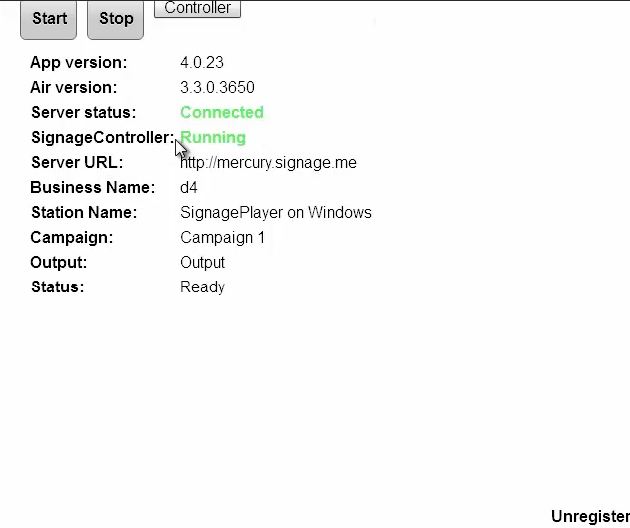
The SignageController (also known as SignageController) is a vital part of the Media Player software suit. It insures that the SignagePlayer is running at all times and monitors the health status of the player. It is also responsible for rebooting the SignagePlayer, provides remote snapshots and more. You should confirm that the SignageController is running. You can tell if the SignageController is running using two methods:
Method1: Using the SignageStudio switch to "Stations" and view the data grid. Each connected SignagePlayer is marked with a colored LED. If the LED icon is marked in yellow, it means that the SignagePlayer is connected to the backend server; however the SignageController is not running. A Red LED means the SignagePlayer is not connecting and a Green LED means that all systems are good; SignageController is running and the SignagePlayer is connected.
|
|

Method 2: Simply by looking at the graphical user interface of the SignagePlayer you can tell the status of both SignageController and status connection to the backend server.
|
|
REAL TIME SNAPSHOTS
The SignagePlayer allows you to get live real time snapshot. These snapshots are a great tool to see what is running at a specific location. To get a live snapshot the SignageController must be running. In the SignageStudio go to "Stations" and click on the camera icon to get a live preview of the remote SignagePlayer Desktop version.
Copyrights MediaSignage© Inc